Blog
-
Current Dissertation Research
The purpose of my qualitative case study research is to explore how an organization progresses through the process of adopting innovations (emergent technology). To understand the organizational adoption process, I seek to describe how a specific organization engages in the adoption of mobile learning (mLearning) through the design and development of their own mLearning demo-product within their technology solutions department. My ground-level study will report on the contextual factors within the organization and department that inform the product’s adoption process. I have gathered observational data over a one-year, participant observation experience within the technology solutions department. Serving as an instructional designer and gathering data as an academic researcher in the same setting allowed the rme to gain an intimate view of the adoption process. To collect meaningful data the I have used Activity Theory as a critical analysis lens and employed research on the stages of organizational adoption to understand the data in a longitudinal manner.
-
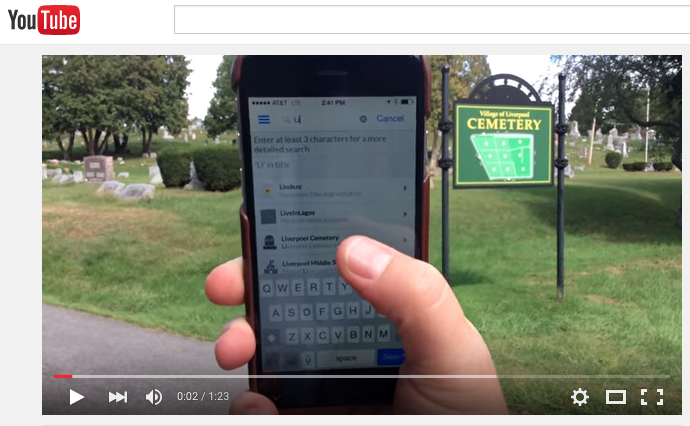
A Match Made in Heaven: Google Maps and Augmented Reality #edtech #AR #mLearning #VR
I just completed a very successful collaborative custom map project with 100 students which I then converted to be used in a sweet augmented reality app.
Here’s the details…
Liverpool Cemetery Mapping Project
Over 100 students at Liverpool Middle School collaborated on a Liverpool Cemetery Mapping project. The PBL scenario allowed students to work individually, collaboratively, and with their social studies and ELA teachers. Students researched, photographed, and digitally-labelled gravestones in the Liverpool Cemetery. The project was guided by the work of former, Liverpool CSD Social Studies teacher, Clarie Deloria’s “Liverpool Cemetery: A Walking Tour” book. Students visited the cemetery, photographed and transcribed their assigned gravestone. Students completed a custom Google Map complete with historical profiles for over 30 gravesites: https://www.google.com/maps/d/u/1/edit?authuser=1&mid=zlDDTMGv5bR8.kuUaPahKBzrE
The project was then converted with Wikitude, an augmented reality (AR) program, that used the student created Google Map content. AR is the integration of digital information with the live video or the userís environment in real time. See the video: https://www.youtube.com/watch?v=DySC4iQLtZM). Through the use of the~Wikitude App (free app) visitors to the cemetery can see where sites are, how far they have to walk to see them, and the historical profiles for each site.
The directions for creating your own Wikitude augmented reality map can be found at: http://www.wikitude.com/build-wikitude-world-google-collaborative-maps/
-

Is anyone paying attention? Can mobile devices rescue our Learning Environments? #mLearning #mobile #edtech #edchat

I recently completed several graduate courses where I noticed (more than usual) the prevalence of laptops in the instructional space. Half of my peers had open screens for most of the class. I found myself wondering, what are they typing? What are they looking at? Facebook? Twitter???? The eyes down, clickety-clack of the keyboard MUST have an effect on instructors and trainers. As a classroom teacher I often tell my students to “listen with their eyes” and when using laptops, to “lower their screens” during direct instruction (inevitably the machines, log out, go to sleep, and have to be reloaded). (more…)
-

Oregon Trail: Single UX to Multiple UX #edgaming #edtech #UX
Remember Oregon Trail? dysentery, cholera, broken wagon tongue… good times right?
Even after the 12 years I’ve been using the Oregon Trail (OT) Game in my seventh grade classroom it never ceases to amaze me how excited my students always get about such a simple game. A blogger referred to the Oregon Trail game as the only “good” educational game adding a quote by game reviewers Screwattack.com “Let’s face it. Educational Games suck…except Oregon trail.” (The_Light_Triton, 2008). If you are not familiar with Oregon Trail, first off: WHERE HAVE YOU BEEN? second, check out this gamespot review of the classic 1985 version in less than 60 seconds: http://www.gamespot.com/the-oregon-trail-1985/videos/oregon-trail-video-feature-1-6154988/
Currently, I’m using OT v5 (2001) and I, like many of you, loved hunting on the MECC (1985) version I used to play as a kid, I wasn’t too concerned with all that extra stuff (history facts). With my veteran-student OT experience fresh in mind, I redesigned this single-user experience into a multi-user experience, so that we are all focused on one adventure and we all can talk about the common shared experience. The teachable moments are numerous! Collaboration, Interdependence, Consequences, Critical Thinking…. monumental attributes for Social Studies Class can be gleaned from thoughtful gaming integration! (more…)
-

Paradigm Shift: #mLearning meet #PD
mLearning
Mobile learning (mLearning) is rapidly gaining acceptance internationally for users in many contexts. Smartphone users expect that their device will deliver content anytime, anywhere on-demand. A culture shift is occurring where anecdotal, scheduling, and calculating knowledge is no longer carried as cognitive space since mobile devices are effectively and efficiently bearing that burden. Is this a bad thing? Similar to how a common computational calculator is not scene as detrimental to advancing scientific knowledge mobile devices are freeing their users to focus on developing creative synthesis of knowledge. However, like the calculator gained more functions and different screen sizes, mobile learning cannot afford to standby as technology becomes richer and users more savvy. (more…)
-
Classroom 2.0 #pd #teaching #learning
 We finished our 6 hour “Classroom 2.0: Teaching in a Digital World” workshop. What a success! Our presenter team approached the event using the “Apple Store Model”: meaning we wanted a judgement-safe, productive atmosphere for our colleagues to explore new interactive approaches to teaching in a 2.0 world. We opened by developing the concept of the needed educational paradigm shift where the static (1.0) state in education was rapidly moving toward a dynamic (2.0) world of collaborative & exploratory learning. The YouTube video from The Ghetto Film School served as a cool, fast-paced narrative on the need to foster creatively in today’s digital citizens, tomorrow’s leaders.
But as a PD team we recognized that our own comfort in dynamic teaching started without experience in dynamic learning. We felt if our colleagues could experience the paradigm shift as leaners, then perhaps they could adopt the shift as instructors/facilitators.
-
Gaming in the Classroom #edtech #edgaming #angrybirds
 Incorporating the novelty of gaming into an instructional atmosphere can be tough and will definitely come under scrutiny by colleagues. Realizing the attention grabbing implications, I’ve been exploring how to effectively and efficiently bring in gaming to my classroom setting. Last night, I received an email from a parent (also a teacher) about my use of Angry Birds in the classroom. “Ut-oh, I’m toast!” is all I could think, I quickly racked my brain for the appropriate pedagogy to support my decision to bring gaming into my classroom.. then I read on:
“…was sharing your tech skills in getting Angry Birds to operate on a SmartBoard. Running apps through the smart board is something I’d like to be able to do, so I was curious if you were running it through an iPad/iPod App or from the Google Chrome App. Of course our district doesn’t run on Macs or Laptops, so it may not work the same….but any tips you’re willing to share are appreciated.”
My response: “I’m running apps with Google Chrome. It should work great on your PC too. I was testing it out for a Classroom 2.0 PD workshop I presented. The classroom implications for these apps is endless :)” I couldn’t help but justify my actions, I nearly added: “and you can calculate the speed at which the birds fly by using the formula speed=distance/time.” Since I was very proud to have gotten my bird to go 32cm per sec!